
Desktop app multichat feature
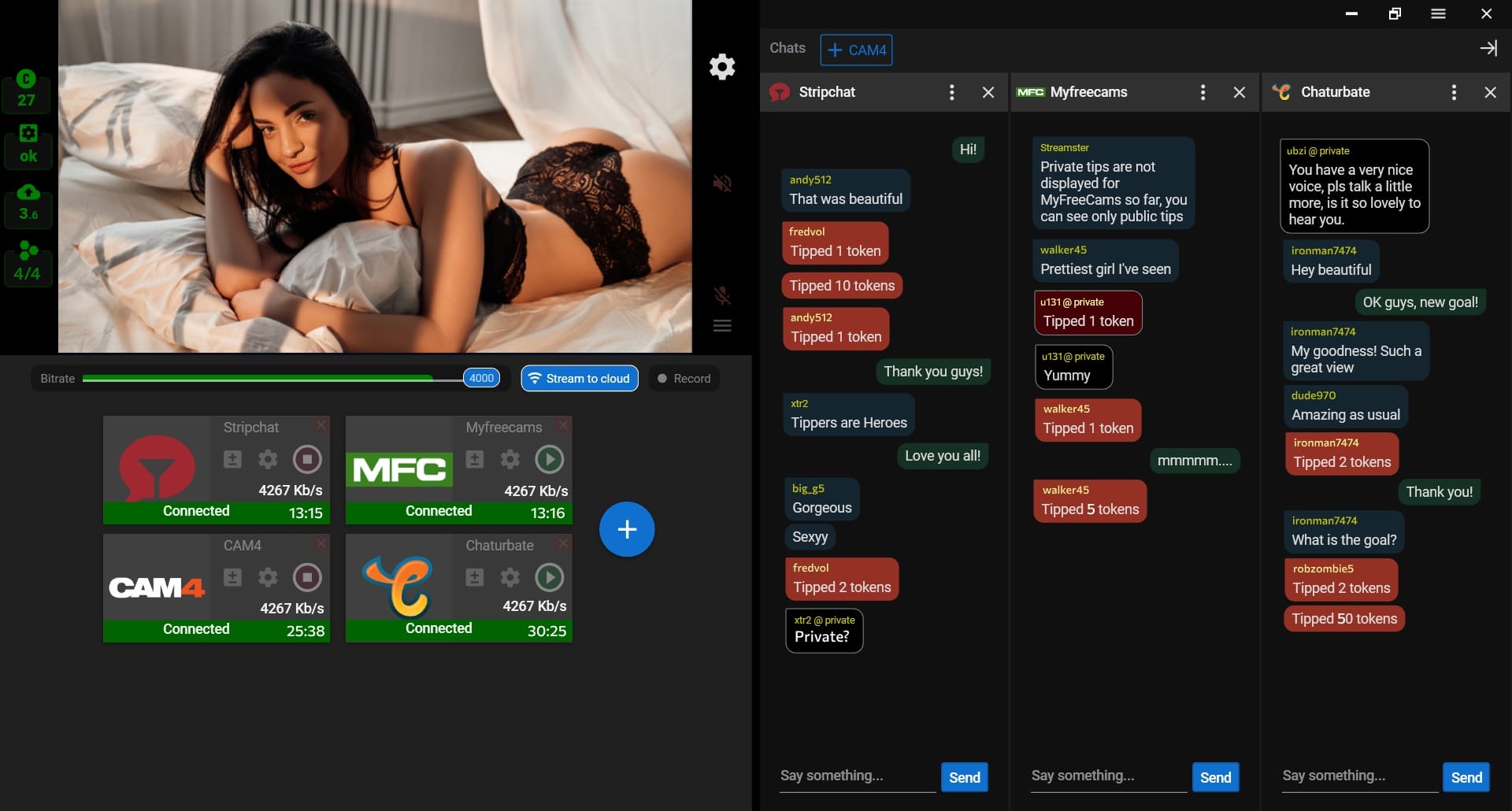
The new multichat feature in our multistreaming app allows cam models to engage with audiences across multiple platforms simultaneously, increasing both their visibility and earning potential. By managing all chats in one interface, you can streamline your workflow, respond to fans more efficiently, and maintain a consistent presence across streams. This feature also enables better time management, as models can prioritize high-traffic rooms and maximize interaction without switching between different tabs or devices. It’s a powerful tool for boosting income and building a loyal fan base.
With Streamster multichat you can read your public and private messages, receive tips notifications and write and your messages. It can be done on the PC with Streamster desktop app, or on your mobile device with Streamster mobile app.
Multichat features
- Read public chat messages
- Read private messages
- Receive tips notifications
- Send messages to chat
- Use remotely
- Your data is secured
Available on




More cam sites will be added soon…
More Streamster Desktop app benefits
When you live stream with Streamster, the hard computer work happens at our end, not yours. All video-splitting processes take place on our servers which minimizes the load on your processor and keeps your internet usage at a minimum. Streamster makes it easy to manage multiple streams at the touch of a button so you can increase your audience and get the exposure you’re looking for. Multiple streams management is easy no matter how many platforms you want to connect at the same time, and you can broadcast to any platforms that support RTMP. Better still, during a multiple stream broadcast your processor load and internet traffic usage will be the same as if you were streaming to a single website.
Streamster offers an unmatched level of freedom and flexibility during your live sessions. With our solution, your smartphone or tablet becomes a robust remote control, allowing you to manage your stream effortlessly while moving freely in front of the webcam. Whether adjusting settings, interacting with viewers, or switching angles, our user-friendly app ensures you stay in complete control without needing to be tied to your computer. Enhance your performance, engage your audience more dynamically, and enjoy the freedom to express yourself like never before. Learn more
Run a webcam modeling studio and need several user accounts? Create a business account, manage all the users on one dashboard, get discounts, and control the stream of each model remotely during the stream. Learn more.
FAQs
How much does it cost?
The multichat feature is available in the free version of the Streamster desktop app. Moreover, we don't limit the number of chats you can use simultaneously. Even if you stream to the site not using Streamster, you can still use Streamster's multichat feature without limitations. Our multistreaming prices remain the same: 2 destinations for free and up to 10 in paid plans
Is it easy to use?
Absolutely! Streamster desktop app can be set up in a couple of clicks. You don't need any additional software (specific browsers or browser extensions) to make chats work - all settings are set inside the application.
Is it compatible with Mac?
Unfortunately, we don't have a desktop version for Mac at the moment. However, we're working on a browser version of multichat that can be used on Mac as well. It will be available soon.