Streamster Remote
Introducing our innovative software explicitly designed for cam models, offering an unmatched level of freedom and flexibility during your live sessions. With our solution, your smartphone or tablet becomes a robust remote control, allowing you to manage your stream effortlessly while moving freely in front of the webcam. Whether adjusting settings, interacting with viewers, or switching angles, our user-friendly app ensures you stay in complete control without needing to be tied to your computer. Enhance your performance, engage your audience more dynamically, and enjoy the freedom to express yourself like never before.
Cam sites compatibility
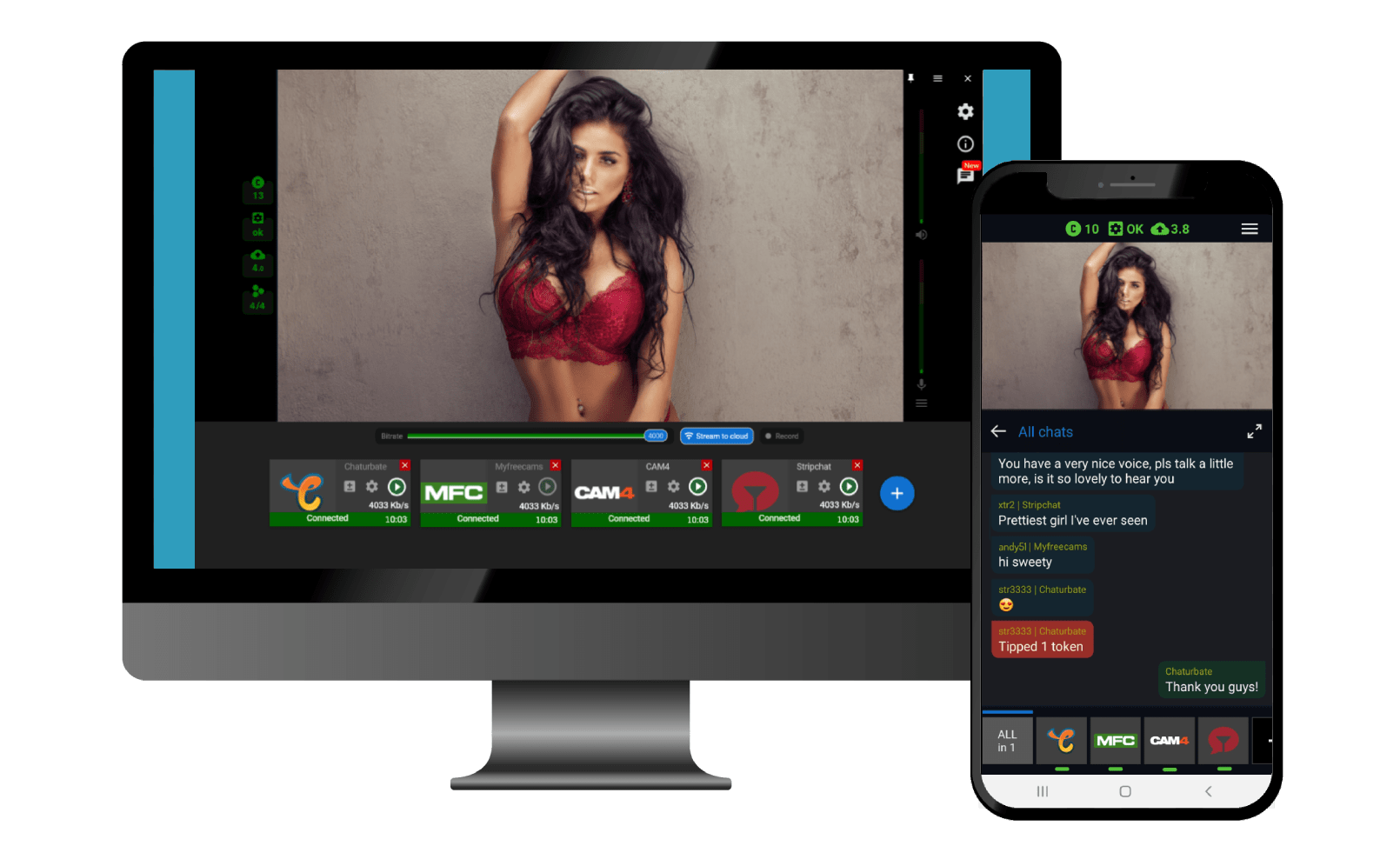
Built-in chat
Tips notifications
Video preview
Start/stop stream
Camera zoom
Stripchat
Chaturbate
MyFreeCams
Cam4
BongaCams
CamSoda
EPlay
SoulCams
AmateurTV
VXmodels
SugarBounce
Streamster Remote Features
- Watch video preview Ensure that you look perfect in real-time and make instant adjustments from anywhere in the room.
- Receive tips notifications Instantly acknowledge and respond to viewer support, enhancing interaction and keeping the momentum of the session without needing to constantly check the PC display.
- Communicate in chats Stay engaged with viewers more flexibly and privately without being tethered to the computer
- Start/stop stream Starting and stopping streams directly from a smartphone, especially when multistreaming, simplifies the process by allowing you to manage multiple streams efficiently from anywhere.
- Switch between cameras Effortlessly change perspectives and angles during a stream, enhancing the variety and engagement of the broadcast.
- Use camera zoom Be flexible to adjust the view and framing of her stream on the go, offering greater control over the visual presentation and allowing for quick changes.
More Streamster Mobile app benefits
You can increase your audience and incomes by streaming several platforms at once with your smartphone! Multistreaming to several sites is crucial for cam models as it maximizes their reach and audience engagement by broadcasting to multiple platforms simultaneously. Using a smartphone for this allows you to manage and control these streams effortlessly from one device, providing the flexibility to monitor and interact with diverse audiences in real-time, all while on the move.
No matter if you multistream with your phone or with your computer, both mobile and desktop apps allows you to manage all your chats and other cam sites events on one screen. You can receive notifications about tips, read private and public messages. Furthermore, you can also write your messages in the Streamster app, and they’ll immediately appear on the cam site.
If you operate the cam studio and your models use Streamster software for live streaming, try our web-based solution to manage their broadcasts. You can watch live previews, control live streams and more. Explore Further
FAQs
How much does it cost?
Streamster mobile app can be downloaded and installed for free. The remote control feature is available with any pricing plan, including the free one. However, if you need to use it for multistreaming to more than two cam sites, please choose one of the paid tariffs according to our pricing plans.
Is it easy to use?
Absolutely! Our software is designed with ease of use in mind. Setting it up is quick and straightforward, with an intuitive interface that lets you connect your smartphone to your webcam setup in just a few steps. Whether you're tech-savvy or new to using advanced tools, you'll find our app simple to navigate. Control your stream, interact with viewers, and manage your settings—all with a few taps on your phone. It's all about giving you the freedom to focus on your performance without any technical hassle.
What devices are compatible?
Our software is compatible with most modern smartphones, including both iOS and Android devices. As long as your smartphone is running a relatively recent version of iOS or Android, it should work seamlessly with our app. Additionally, our software is designed to integrate with various webcam setups, whether you're using a standalone webcam, a built-in camera on your computer, or a more advanced camera system. We aim to support a wide range of devices to ensure that you can use our software with your preferred streaming setup.
How can I download Streamster mobile app?
The app is available in the Google Play and App Store; the links are in the footer below.